How to sell a Shopify store: What it’s worth and how to get there


Blog


 The Exit Podcast
Thinking about selling your Shopify store? Whether you’re ready to move on to a new venture, simplify your workload, or cash out while the market’s hot, you’re not alone.
Global Ecommerce revenue is expected to reach $6.88 trillion by the end of 2026, and platforms like Shopify are driving that growth.
Shopify stores are in demand, with ‘Shopify’ the most-searched term on our marketplace in H1 2026. Buyers are actively seeking online stores with steady traffic, automated systems, and clear profit potential.
In this guide, you’ll learn how to prepare for selling your Ecommerce business, determine its value, connect with serious buyers, and handle the transfer process securely, step by step.
There are plenty of valid reasons to sell your Shopify store. Maybe you’ve grown it profitably and want to cash out while demand is high. Or maybe you’re shifting focus to another venture and need time, capital, or both.
You’re not alone; thousands of Shopify stores are listed for sale each year, and many of them fetch strong multiples.
Common reasons to sell include:
With Ecommerce users expected to reach 4.1 billion by 2030, now is a great time to pass your store on to a new owner who is ready to scale it even further.
And the demand is already there. Active buyers on our marketplace reached 123K in the first half of 2026, up 18% year-on-year. And across those registered, we estimate about $120 billion in acquisition capital waiting to be used.
The market is filled with serious buyers who’re benchmarking against completed transactions before they make an offer, with ‘recently sold’ the fastest-growing search term on our marketplace.
Source: Flippa, H1 2026 Insights Report
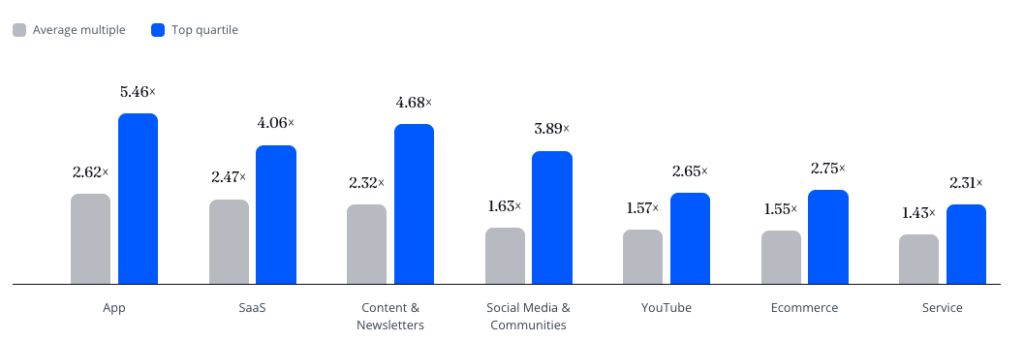
Let’s start with benchmarks. Based on sold deals on our marketplace, Ecommerce businesses commanded an average 1.55x profit multiple, with top-quartile businesses reaching 2.75x, according to our H1 2026 Insights report.
For example, a Shopify store generating $3,000 in monthly profit with stable growth could be valued anywhere between $56,000 and $99,000, using the average multiples above.
Source: Flippa, H1 2026 Insights Report
Where your store lands depends on how buyers assess the quality and sustainability of your underlying business. That means where traffic comes from, the operating costs, and brand strength all come into play.
Here are some of the common valuation levers:
For a full valuation breakdown, see our Shopify Store Valuation guide. If you want to dive more into Ecommerce multiples, read our Shopify Valuation Multiples guide.
If you’re unsure of your store’s value, Flippa’s free Shopify valuation tool uses actual sales data and industry benchmarks to help you price your business realistically.
Before you list your store, you need to get it ‘sale-ready’. Think of this as presenting your business in the best possible light, with full transparency. Buyers want a clear picture of how your store operates, what it earns, and how it can grow.
Buyers want to see clean, verifiable financials. Make sure to:
The more data you can provide, the more trust you’ll build with buyers.
Shopify recommends checking existing contracts or obligations you have with the platform to determine whether they’ll be impacted by the sale of your store. For example, if you’re using Shopify Capital or Shopify Credit, you’ll be unable to transfer your store.
Your app stack is every third-party tool that’s installed and running on your Shopify store. While they can help optimize your store, they also often come with subscription costs and added code that can slow down your store’s load time.
To audit your app stack, evaluate each app by these factors:
Once you’ve audited your app stack, document what the remaining apps do, their cost, their settings, and how they fit into your workflow.
Your inventory needs to be well managed and up-to-date before you consider listing your store for sale.
This means:
A buyer will want to know that, when they take over your store, they’ll be able to continue supplier relationships. That means documenting who your suppliers are, where you’re sourcing from, and clarifying supplier relationships will continue post-acquisition.
For some owners, supplier relationships are personal. Or, suppliers might have a minimum order commitment that’s not realistic or transferable to a new owner. These can be deal breakers. If a buyer’s not confident they can continue the business as-is, they might reconsider the deal.
To reduce this risk, you should consider:
Well-organized and clean customer data makes it easier to run your store, target prospects, and ultimately hand over to a new buyer. These suggestions will help make sure you only keep the data relevant to your store and potential new owner:
A business using AI automation effectively is often more efficient and less dependent on its owner. Stores that integrate AI tools are more interesting to potential buyers, with our data showing searches for ‘AI-powered business’ on our site were up 20% in the first half of 2026.
And Ecommerce stores are understanding the value of AI tools to buyers, with growth in AI-related Ecommerce listings up +26%.

Source: Flippa, H1 2026 Insights Report
If you’re looking to incorporate AI tools into your business, you could start with automating:
If you’re already using AI tools, document what each tool does, what it costs, and how it fits into your workflow.
A buyer will want to know how much time it takes to run your store each week and whether those tasks can be outsourced. Create a breakdown of regular activities like:
Outline each task with time estimates, so buyers understand the workload and know what to expect.
Think about what makes your store stand out. Is it the niche? A loyal email list? High-converting product pages? Maybe your brand has great reviews or strong repeat customer rates.
Include details like:
Framing your store’s strengths clearly can boost your valuation and speed up the sale.
For a quick and easy rundown of what you need to prepare before listing, check out our Shopify Store Sale Checklist to get you ready to sell your Shopify store on Flippa.
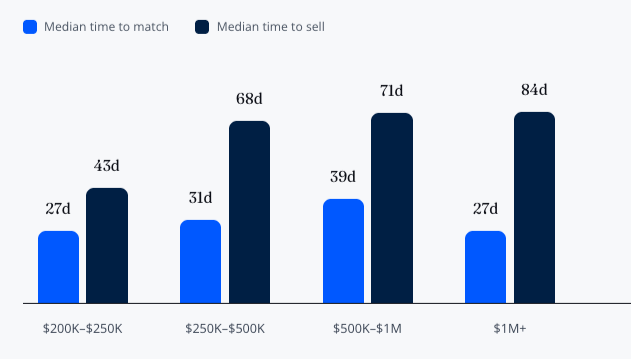
The time to sell your store can vary, but most listings across all categories on Flippa close within an average of six to 12 weeks, according to our H1 2026 data.
Here’s what a typical timeline looks like:
Our H1 2026 Insights Report found $1M+ deals across all categories matched with buyers as quickly as deals a quarter of their size (median 27 days). The median time to sell, however, scaled with deal size.
Diligence gaps, undocumented operations, and incomplete financial records all extend sale times, which is why preparing your store before listing will get you ready before buyer questions start to come in.
Source: Flippa, H1 2026 Insights Report
Once a buyer is interested, you’ll enter a back-and-forth to finalize the deal. Transparency, communication, and security are key here.
You’ll negotiate the sale price, payment method, and which assets will be included, such as the store, domain, apps, social accounts, email lists, and inventory. You might also decide on post-sale support, such as helping the buyer for a week or two after handoff.
Always use a secure payment method. Our site’s built-in escrow system protects both you and the buyer. You can use either FlippaPay or Escrow.com, depending on the transaction, with the funds secured before the seller begins transferring agreed assets.
Once the buyer receives and verifies the assets, the payment is released to the seller. Escrow helps verify that everyone delivers what’s promised and ensures that money or assets aren’t transferred prematurely.
Once payment is secured, work through the handover in a clear order:
For a comprehensive breakdown of selling your store on Shopify, check out their Help Center.
Once the buyer confirms they’ve received the agreed-on assets, they can inspect and verify the business before releasing the funds.
Before closing, make sure both sides have confirmed everything included in the sale has been transferred.
Here’s how the process works:
Start by benchmarking your store’s value against real-world sold deals. Don’t know what your business is worth? We offer a free Shopify valuation that draws from thousands of sold sites across our global platform to give you a clear estimate of price.
Once you’ve prepped your store, it’s time to list it. Flippa’s Shopify marketplace makes it easy to reach a global audience of buyers; over 400,000 weekly active users browse businesses on the platform.
Want to stand out? Include a short video walkthrough or Loom recording explaining your store. It helps buyers connect with your brand and builds trust early on.
An apparel brand with a focus on improving wardrobe essentials was founded in 2019 and quickly gained a loyal customer base that valued quality over hype.
After six years of building a successful brand, the founders decided to exit. They’d built their brand across several markets, automated processes, and established an incredible 45% return customer rate.
Buyers saw predictable revenue, lean operations, and a loyal customer base that trusted in the quality of the products.
In 2024, the company sold for $1.3M, representing a 1.9x annual profit multiple.
The numbers that got the founders there:
With the right preparation, selling your Shopify store can be a straightforward process. From getting a professional valuation to organizing your finances, operations, and assets, knowing what buyers look for can help you approach your listing with confidence.
When you sell your Shopify store on Flippa, you can easily connect with serious buyers, showcase your business, price your store competitively, and close the deal efficiently and securely.
The key is making your store easy to understand, transfer, and attract the right buyer. Getting your store in order before you list means you’ll be in a stronger position to negotiate and complete the sale.
Whether you’re just exploring a sale or preparing to list your business, these guides will dive deeper into the process, from valuation through to closing.
Ecommerce businesses averaged a 1.55x profit multiple in H1 2026, with top-quartile businesses reaching 2.75x on our marketplace.
Your store’s profit multiple will depend on a number of factors, including profit, growth, brand strength, and owner involvement.
Yes, you can sell your Shopify store directly through an online marketplace without needing to hire a traditional broker. Our platform offers self-service tools to help you list and connect with buyers.
If your store is worth more than $100,000, a broker might help you reach higher-quality buyers and close deals faster.
Buyers are looking for profitability, revenue consistency, growth, traffic quality, and owner involvement. They want to know how easily they can take over the store and what it will continue to earn.
Once a deal is agreed and the buyer’s payment is secured in escrow, the seller transfers store ownership from the Shopify admin (Settings > General > Transfer store). The buyer gets an email invitation to accept, and once they do, they take over full admin access, store data and inventory. A Shopify store can only have one owner, and only the current owner can start the transfer. Shopify Plus stores can’t be transferred this way. The owner has to contact Shopify Plus Support to arrange the change of ownership.
Some things don’t move across automatically and need to be handed over separately:
A few things can hold up a transfer. A store can’t be transferred while it has an active Shopify Capital or Shopify Credit account, and any Shopify Balance account has to be emptied first. If the store hasn’t reached its billing threshold at the time of transfer, the buyer becomes responsible for any outstanding Shopify bills.
Once the transfer is done, the buyer checks the store and agreed assets, and the escrow funds are released to the seller.

Hear from business owners and entrepreneurs who have bought and sold online businesses on Flippa.

Search our knowledge base for answers to common questions.